
Why Every American Moving to Portugal Needs a Password Manager
The quick answer: get a password manager. Right now, before your move if you haven't left yet, or today if you're already here. I recommend 1Password for most people. Bitwarden is an excellent alternative, especially if you want a solid free option. I'll cover both of those plus two more options below.
A password manager generates strong, unique passwords for every account you have. It stores them securely. It syncs across your phone and computer. And it does a lot more than just passwords. For Americans living in Portugal, a password manager solves problems you might not even realize you have yet.
Moving Abroad Exposes Your Weakest Security Habits
You probably got away with sloppy password habits for years. Most people do. Moving to Portugal has a way of revealing just how fragile your online security setup really is.
You Now Have a Lot More Online Accounts
Think about how many online accounts you had before your move. Your bank, credit cards, email, Amazon, Netflix, Social Security, IRS, health insurance. The average person manages over 250 online accounts. That number was around 100 in 2020.
Now add your Portuguese accounts. Your bank (Millennium, ActivoBank, Novo Banco, or whichever you chose). The Finanças tax portal. SNS 24 for healthcare. Utility companies. Portuguese streaming services. Your NIF registration. Your AIMA account. Amazon Spain (or Germany). Worten. Continente or Pingo Doce loyalty programs.
Every single one of those accounts needs a unique, strong password. If you're reusing passwords across any of them, you're one data breach away from a serious problem.
Your Passwords Are Probably Terrible (And That's Normal)
If you can remember a password, it's probably a weak one. The human brain is good at many things. Generating and storing dozens of random 20-character strings is not one of them.
The most common approach? Pick a password you can remember and reuse it everywhere. Maybe you add a number or swap an "a" for an "@" and call it secure. It's better than nothing, but only barely.
In about 36% of cloud data breaches, attackers used valid credentials. They didn't hack their way in. They logged in with a real username and password. Often that password was stolen from one service and tried on dozens of others. If your Netflix password is the same as your bank password, one breach compromises both.
Text Message 2FA Is Unreliable from Portugal
Two-factor authentication (2FA) adds a second layer of security by requiring a code in addition to your password. Many US services send that code by text message (SMS). But SMS-based 2FA has serious problems for expats.
SMS messages can be delayed or fail entirely when you're on a foreign network. If you ported your US number to a service like Tello and rely on Wi-Fi calling, text delivery can still sometimes be inconsistent. SIM swapping attacks, where someone convinces your phone carrier to transfer your number to their device, remain a real threat.
A password manager with a built-in authenticator generates 2FA codes right on your device. No text message needed. No network dependency. It works whether you're on Wi-Fi in Lisbon, using mobile data in the Algarve, or sitting in an airport with no cell service.
What a Password Manager Actually Does for You
Most people think of a password manager as a place to store passwords. That's like saying your phone is a device for making calls. Technically true, but it misses a lot of the value.
Strong, Unique Passwords for Every Account
A password manager generates random, complex passwords for each of your accounts. Something like k8#mP$2vLx!qR9nW for one account and a completely different string for the next. You never need to see, remember, or type these passwords. The password manager fills them in automatically.
This means one compromised account stays one compromised account. An attacker who gets your Continente loyalty program password has zero access to your Chase bank account.
Two-Factor Authentication Codes, Built In
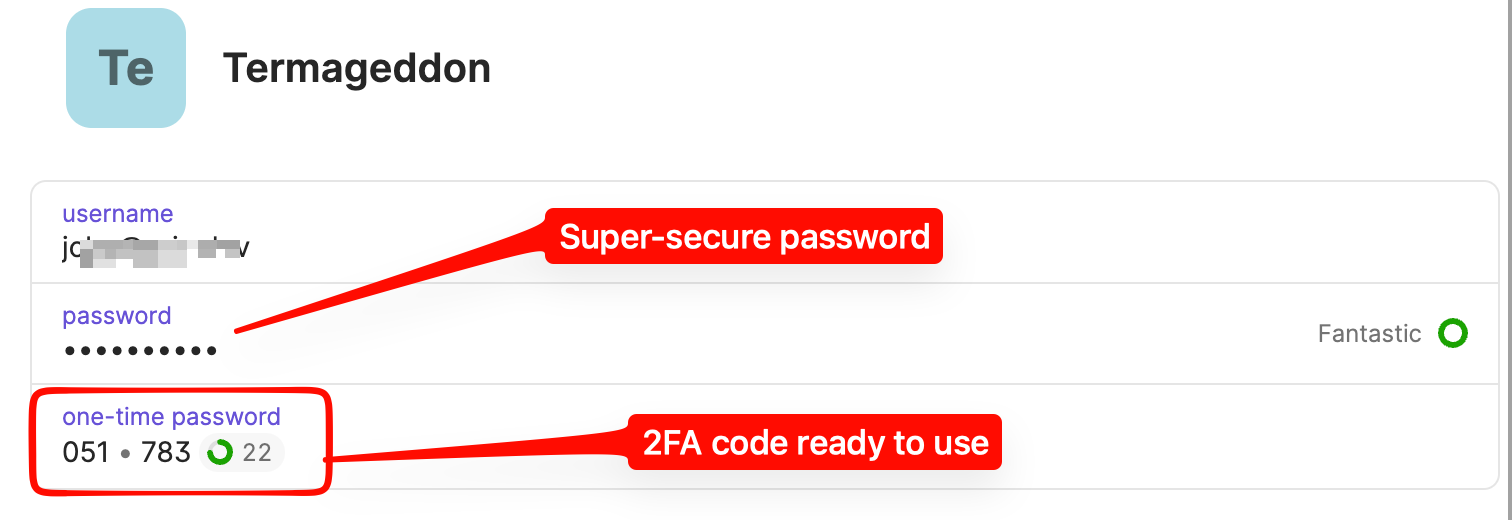
All four password managers I recommend can generate time-based one-time passwords (TOTP), the six-digit codes that refresh every 30 seconds. Instead of waiting for a text message, you open your password manager and the code is right there, next to the login it belongs to.
This is faster, more reliable, and more secure than SMS-based 2FA. Set it up once for each account that supports it, and you're done.
A Secure Vault for Your Important Documents and Numbers
This is where password managers become especially valuable for expats. You can securely store:
- A photo or scan of your Cartão de Residência (residency permit card)
- Your passport information
- Your NIF (Número de Identificação Fiscal, your Portuguese tax ID)
- Your NISS (Número de Identificação de Segurança Social, your social security number in Portugal)
- Your SNS number (national health service)
- Your Portuguese bank account details and IBAN
- Your US Social Security number
- Insurance policy numbers
All of this stays encrypted, synced between your phone and computer, and accessible whenever you need it. When a Portuguese government office asks for your NIF and you can't remember if it starts with 2 or 3, you pull out your phone and there it is.
Safe Sharing with Your Spouse, Family, or Accountant
Password managers built for families let you share specific items with specific people. This is a huge upgrade over texting passwords to your spouse or emailing login details to your accountant.
Real examples of how this helps:
- Share your Finanças portal login with your Portuguese accountant so they can file your taxes
- Share streaming service passwords with your spouse without writing them on a sticky note
- Give your adult children emergency access to critical accounts
- Share your Portuguese banking login with your partner for joint financial management
The sharing is encrypted and controlled. You decide who sees what, and you can revoke access at any time.
Breach Alerts That Help You React Fast
Good password managers monitor known data breaches and alert you if any of your accounts appear in leaked databases. When a breach happens (and breaches happen constantly), you get a notification telling you exactly which account is affected. You can then change that one password in seconds.
Without a password manager, you might not find out about a breach for months. With one, you know the same day and can fix it immediately.
Expat-Specific Use Cases You'll Thank Yourself For
Everything above applies to anyone. These next scenarios are specific to life as an American in Portugal.
Accessing IRS and Social Security Through ID.me
Both the US Internal Revenue Service and the Social Security Administration use ID.me for secure login. ID.me supports authenticator-based 2FA, which means you can use your password manager to generate the login codes instead of relying on SMS texts that may or may not arrive in Portugal.
This matters around tax season. When you need to access your IRS transcript or check your Social Security statement, the last thing you want is a 2FA code that never arrives because you're 5,000 miles from your US carrier's network. A password manager with built-in TOTP codes eliminates this problem entirely.
Keeping Track of NIF, NISS, SNS, and Every Other Number
Portugal loves identification numbers. You will accumulate several:
- NIF (Número de Identificação Fiscal): Your tax ID. You need this for almost everything.
- NISS (Número de Identificação de Segurança Social): Your social security number in Portugal.
- SNS (Número de Utente do Serviço Nacional de Saúde): Your national health service number.
- Residency permit number: On your Cartão de Residência.
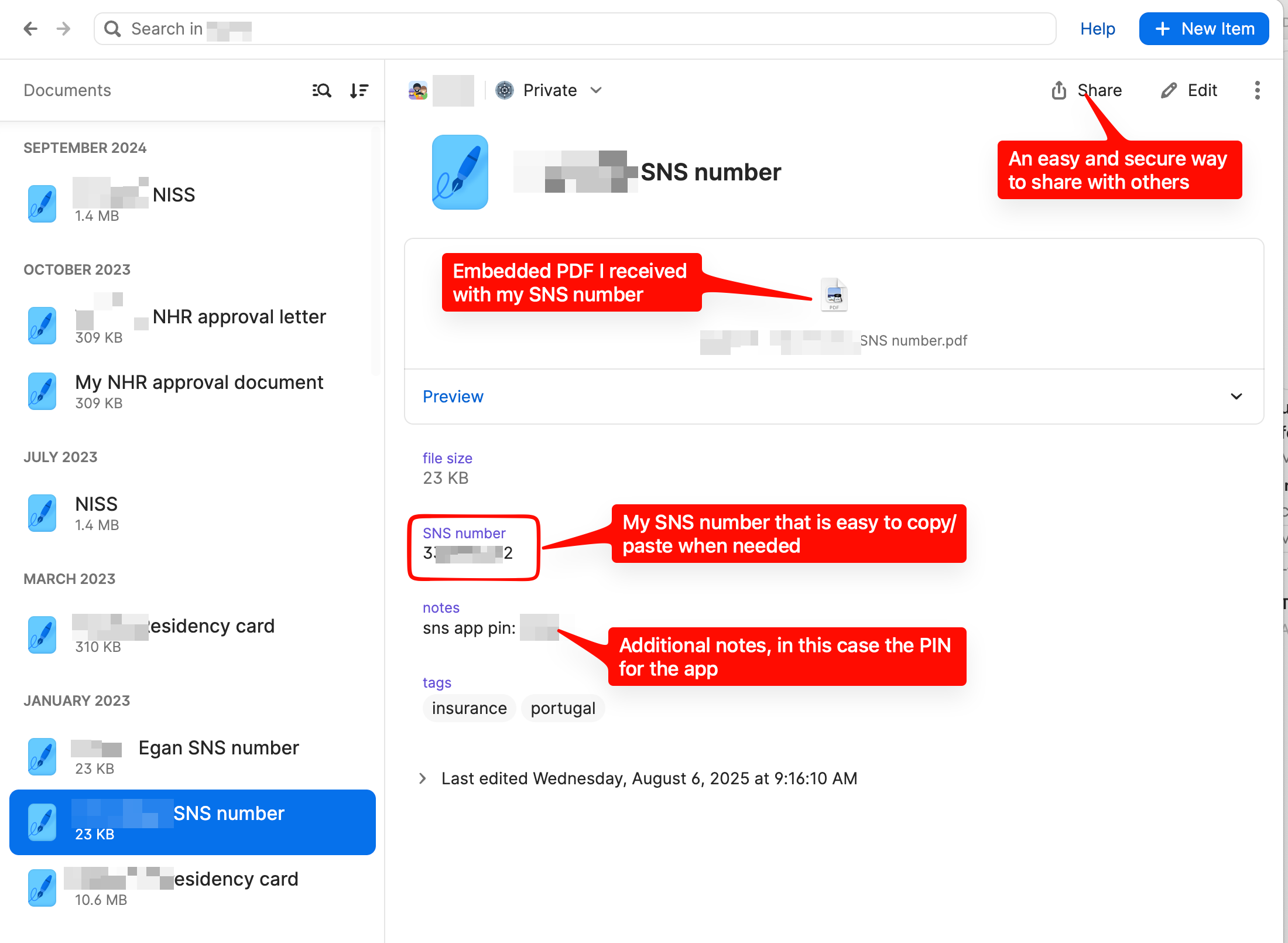
These numbers come at you fast when you first arrive, and you'll be asked for them constantly. Store them all in your password manager. When someone at a pharmacy or government office asks for your SNS number, it's three taps away on your phone.
Sharing Your Finanças Login with Your Accountant
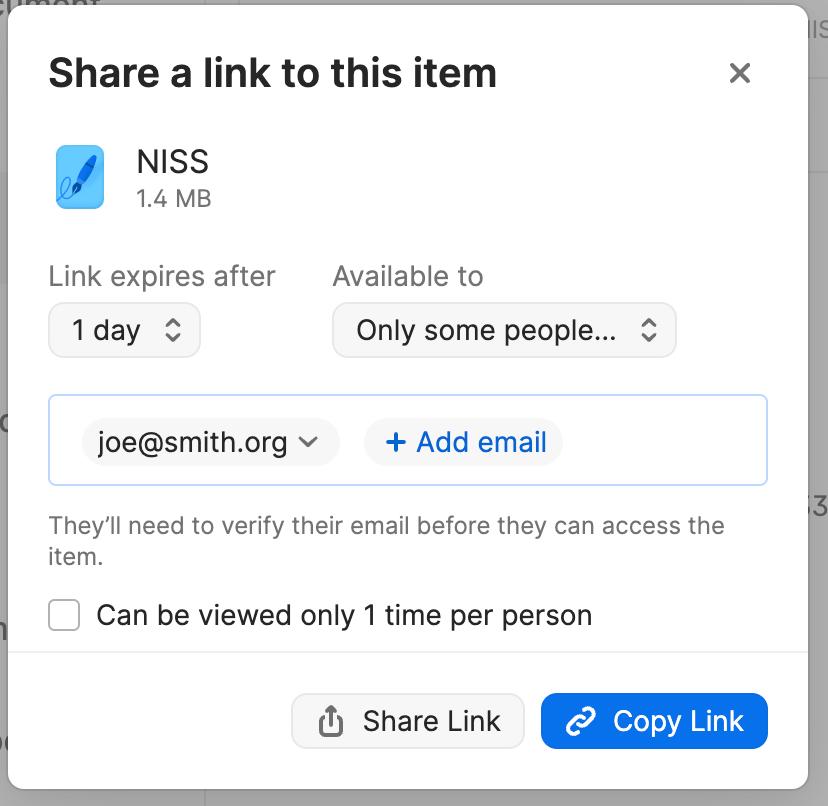
If you hire a Portuguese accountant (and most American immigrants do, at least for the first year or two), they'll likely need access to your Portal das Finanças account. The traditional approach is to email them your username and password. This is a terrible idea for obvious reasons.
With a password manager's secure sharing feature, you can share the login directly. Your accountant gets access without the password ever traveling through email. If you change accountants, you revoke access with one click.
Your Residency Card, Passport, and Documents Always on Your Phone
Carrying your original residency card everywhere is risky. Losing it means a painful replacement process through AIMA. But you also need to show it more often than you'd expect.
Store a clear photo of your residency card, passport, and other key documents in your password manager's secure vault. This gives you an encrypted, always-available backup on your phone. It's not a legal replacement for the original, but it's incredibly useful for everyday situations where someone needs to see your details.
Bad Habits to Break Before You Move
If you recognize yourself in any of these, a password manager fixes all of them.
Reusing passwords across accounts. This is the single biggest security risk most people take. One breach exposes every account that shares that password. A password manager makes every password unique with zero extra effort.
Using simple, memorable passwords. "Portugal2024!" feels clever. It's not. Password managers generate truly random passwords, so you never have to try to be clever again.
Sharing passwords through text or email. Every text message or email containing a password is an unencrypted security risk sitting in at least two people's message history forever. Password managers provide encrypted sharing instead.
Relying on SMS for 2FA codes. Works fine in the US. Becomes unreliable the moment you move abroad. Switch to app-based 2FA codes generated by your password manager.
Keeping passwords in a spreadsheet. A Word document or Excel file on your computer is not a password manager. It's an unencrypted file that any malware can read. Please stop doing this.
Using two or three different systems. Some passwords in Chrome, some in Apple Keychain, some in your head. This creates gaps. Commit to one password manager for everything.
What to Look for in a Password Manager
Not all password managers are created equal. Here's what matters, especially for expats:
Security track record. Choose a company with a strong culture and history of security. Look for independent security audits, transparent security practices, and a clean track record. This rules out many smaller or newer options.
Cross-platform support. You need it on Mac, Windows, iPhone, Android, and as a browser extension. It should sync seamlessly between all of them. When you save a password on your laptop, it should appear on your phone within seconds.
Family plan. Managing passwords as a household is easier and more secure with a family plan. You get shared vaults for things like streaming services, separate private vaults for individual accounts, and the ability to help each other in emergencies.
Built-in 2FA code generator. This keeps your 2FA codes alongside your passwords, in one secure place. Some password managers charge extra for this feature. Others include it at every level.
Passkey support. Passkeys are a newer technology that replaces passwords entirely for supported services. Your password manager should support them now, because more services adopt passkeys every month.
Biometric login. Face ID, Touch ID, or fingerprint login on your phone means you unlock your vault with a glance or a tap. This makes the password manager fast enough that you'll actually use it every time.
Data breach monitoring. Alerts when your email or credentials appear in known breaches. This gives you early warning and time to react.
My Top Recommendations
I've narrowed the field to four password managers that meet all the criteria above. Any of these would serve you well. All pricing is current as of February 2026.
| Feature | 1Password | Bitwarden | NordPass | Proton Pass |
|---|---|---|---|---|
| Individual price | $2.99/mo ($35.88/yr) | $1.65/mo ($19.80/yr) | $2.99/mo (billed yearly) | $2.99/mo (billed yearly) |
| Family plan price | $4.99/mo, 5 users | $3.99/mo, 6 users | $5.99/mo, 6 users | $4.99/mo, 6 users |
| Free tier | 14-day trial only | Yes, generous | Yes, limited | Yes, solid |
| Built-in 2FA codes | All plans | Premium and above | Premium and above | Plus and above |
| Passkey support | Yes | Yes | Yes | Yes |
| Biometric login | Yes | Yes | Yes | Yes |
| Breach monitoring | Yes (Watchtower) | Premium and above | Premium and above | Plus and above |
| Secure sharing | Yes | Premium and above | Premium and above | Plus and above |
| Platforms | Mac, Windows, Linux, iOS, Android, browsers | Mac, Windows, Linux, iOS, Android, browsers | Mac, Windows, Linux, iOS, Android, browsers | Mac, Windows, Linux, iOS, Android, browsers |
1Password: My Top Pick
I've used 1Password for years, and it's what I recommend to most people. The interface is clean and intuitive. The browser extension works reliably. The family plan makes sharing with your spouse simple and secure. Watchtower, their breach monitoring feature, gives you a clear dashboard of your overall password health.
1Password also has Travel Mode, which hides selected vaults when you cross international borders. You choose which vaults are visible during travel, and the hidden ones can only be restored when you turn Travel Mode off. For expats who travel between the US and Portugal regularly, this is a valuable feature.
The one downside: no free tier. You get a 14-day trial, and then it's $2.99 per month for individuals or $4.99 per month for a family of five. For what you get, this is a reasonable cost.
Best for: People who want the most polished experience and don't mind paying for it.
Bitwarden: The Best Free Option
Bitwarden is open source, which means its code is publicly available for security researchers to examine. This transparency builds trust. The free tier is genuinely useful, with unlimited passwords on unlimited devices.
The Premium plan at $1.65 per month unlocks the features expats need most: built-in 2FA code generation, breach monitoring, and secure sharing. The family plan at $3.99 per month for six users is the most affordable family option on this list.
Bitwarden's interface is functional but less polished than 1Password. It gets the job done, and what it lacks in visual refinement it makes up for in value and security credentials.
Best for: Budget-conscious users, anyone who values open-source transparency, or families looking for the lowest-cost option.
NordPass: Solid and Familiar
If you already use NordVPN, you might find NordPass appealing. The NordVPN Plus and Ultimate bundles include a full NordPass Premium subscription, which means you might already have access to it.
NordPass has a clean, modern interface and covers all the essential features. The free tier exists but limits you to one device at a time, which makes it impractical for daily use. The premium plan at $2.99 per month and family plan at $5.99 per month for six users are competitive but not the cheapest options available.
Best for: Existing NordVPN subscribers who want everything from one provider.
Proton Pass: Privacy-First
Proton Pass comes from the team behind Proton Mail, one of the most respected names in privacy-focused technology. If you already use Proton Mail, adding Proton Pass makes sense since the Proton Unlimited plan ($9.99/month) bundles email, VPN, cloud storage, calendar, and password management together.
A standout feature is email aliases. Proton Pass can generate unique email addresses for each account you create, hiding your real email from potential spam and breaches. The free tier includes up to 10 aliases. Paid plans offer unlimited aliases.
Proton Pass is newer than the other options on this list. It has matured quickly and now includes all the core features you need, including 2FA code generation, secure sharing, and breach monitoring. It also offers a unique lifetime plan at $199 for people who prefer a one-time purchase.
Best for: Privacy-focused users, Proton Mail subscribers, or anyone who likes the idea of email aliases.
Getting Started Is Easier Than You Think
The hardest part of using a password manager is getting started. After the initial setup, it becomes effortless. Here's the basic process:
- Choose a password manager from the list above and create your account.
- Install it everywhere. Put the app on your phone, your computer, and add the browser extension to whatever browser you use.
- Create one strong master password. This is the one password you need to remember. Make it long (at least 16 characters) and unique. A passphrase like "correct horse battery staple" works better than something short and complex.
- Import your existing passwords. All four options above can import passwords from Chrome, Safari, and other password managers. This takes a few minutes.
- Start using it. When you log into a site, your password manager auto-fills the credentials. When you create a new account, it generates a strong password and saves it automatically.
- Replace weak passwords over time. Your password manager will flag weak and reused passwords. Replace them one at a time. You don't need to do them all in one sitting.
- Set up 2FA codes for your most important accounts: banking, email, government portals, and financial services.
Within a week, you'll wonder how you managed without it. Within a month, it becomes invisible. You just log into things and they work, securely, every time.
Frequently Asked Questions
What if I forget my master password?
This is the one password you truly need to remember. Write it down and store it somewhere physically secure (a safe, a locked drawer) when you first create it. Some password managers offer recovery options through emergency contacts or recovery keys. Set these up during initial configuration. When I first set up 1Password, it provided me a PDF I printed out with a set of emergency recovery codes. I have that printed document stored in a physically secure location.
Can I switch from one password manager to another?
Yes. All major password managers support exporting and importing your vault. If you start with Bitwarden's free tier and later decide to move to 1Password, you can migrate your entire vault in minutes.
Is it safe to put all my passwords in one place?
Modern password managers use end-to-end encryption. Your data is encrypted on your device before it ever leaves your phone or computer. Even the password manager company cannot see your passwords. This is far more secure than reusing passwords, writing them in a notebook, or keeping them in a spreadsheet.
What happens if the password manager company gets hacked?
Even if the company's servers are compromised, your data remains encrypted. Attackers would get a pile of encrypted data that they can't read without your master password. This is why a strong master password matters, and why reputable password managers use zero-knowledge architecture.
Should my spouse and I share a single account or get a family plan?
Get a family plan. Each person should have their own account with their own master password. The family plan lets you share specific items (like your Netflix login or Finanças credentials) while keeping personal accounts separate. This is more secure and more practical.
I'm not very technical. Can I still use a password manager?
Absolutely. Modern password managers are designed for everyday users. The browser extension auto-fills passwords. The phone app uses Face ID or fingerprint login. After the initial setup (which takes about an hour), daily use requires almost no technical knowledge. You log into a website and the password manager does the rest.
Do I need to pay, or is the free version good enough?
For basic password storage, Bitwarden's free tier works well. But the features that matter most for expats, especially built-in 2FA codes, secure sharing, and breach monitoring, require a paid plan. At $1.65 to $2.99 per month, this is one of the cheapest and most effective security investments you can make.
Member discussion