
Bring your US phone to Portugal: 2026 edition
(Version 1.4)
Most people who move to Portugal (or any other country, for that matter) will want to keep their US phone number for a variety of reasons, including:
- Needing a US phone number for their business activities
- Keeping the same phone number that friends and family use to contact them
- Calling US businesses as needed
- Receiving those 6-digit Two Factor Authentication codes (2FA codes). More on this, later
So, plenty of good reasons to maintain your existing USA phone number. Some people abandon their US phone number, and later regret it, so this guide will also help you get a new US phone number, even when you are here in Portugal. There are a few key technical and business concepts that I’ll explain that are key to understanding why this is the best option for the vast majority of use cases. Like 99% of the time. This is not to say that there are not other ways that will work, but those other ways simply are not as reliable or trustworthy.
Important note: Please read this guide before taking any steps. In particular, do not port your current phone number over to Tello until you have successfully installed and activated the Tello eSIM. Save yourself some stress and extra work. Also, Tello’s tech support and customer service will tell you this can’t be done. They are wrong. That’s the official company line, as Tello no longer offers technical support for activating a Tello eSIM outside the US. It isn’t worth the time to even contact their support for this.
The quick answer
In almost every circumstance, you should port your USA phone number over to Tello, load Tello as an eSIM, enable Wi-Fi calling and set up a Portuguese phone plan on your phone’s second SIM. I recommend against using Google Voice or any other VoIP service, and instead pay roughly $60.00 per year to Tello to keep your USA phone number active and available.
Read on to find out the details.
Who is this for?
Some people actually do have unique needs for their USA phone number, but most people only need the following:
- Ability to place and receive voice calls using their USA phone number, with access to voicemail
- Ability to send and receive SMS text messages, including reliably receiving the 2FA codes as needed
Important words of caution
- If you ask a question in the Americans & FriendsPT Facebook group, you will get a lot really bad answers. Well meaning, but most of the time completely wrong. If someone doesn’t at least ask you what model of phone you have and try to understand the problem, they are giving you random guesses and bad answers. Ignore them.
- Quite a few people seem to make the same mistake: do not port your US phone number over to Tello until after you have successfully activated your Tello eSIM. Tello will assign you a temporary US phone number. Use that to test to verify the eSIM is activated. I have instructions on that process below. Wait to port your phone number over until after you’ve confirmed the Tello eSIM actually works.
- For the love of God, do not keep your AT&T, T-Mobile, or Verizon account active. You are burning money by doing so. Using Tello only costs $5.00 per month per phone, and accomplishes the exact same thing. You may think you have a good plan back in the States, but if it costs you more than $5.00 per month, you are getting ripped off. Some people think it is a clever solution to pay at least 10x what they need to.
- Having the right phone for this is critical. It needs to be paid off and unlocked. If you have an iPhone, you are set. If you have an Android, don’t try this with a cheap model, you need to be using a “flagship” model. Samsung Galaxy S series or Google Pixel phones are great options.
- Using Tello will 100% work if you follow these instructions and have the correct phone. If you do have problems, Tello’s support will NOT help any more. The Tello service still 100% works when set up correctly, but Tello recently changed their company line and no longer support activation of new eSIMs outside the US. Again, this will work, you just can’t call Tello tech support if you have a problem.
- You do NOT need to add any credit to your Tello account for international or roaming use. If anyone tells you that, they don’t understand how this works.
- If you do have a problem, post your question as a comment in the Facebook post for this file. Be sure to indicate what specific model of phone you have, and what phone providers you are currently using. If your phone supports 1 SIM card and 1 eSIM, be sure to mention what service goes with which SIM. Getting a helpful answer depends on you asking a good question. The more context you can provide, the better.
Some key concept and definition of terms
This is where we dig into the technology and business processes that impact how all this works. Some of you may be tempted to skip over this, but please make sure you understand these concepts or you’ll likely have a lot of problems with your USA phone service.
What is 2FA?
Two Factor Authentication, or 2FA, is an important security measure for your online accounts. The two factors are:
- Something you know. Typically, you know your username and password. But, unfortunately, thanks to hackers, it is all too easy for other people to know that same information.
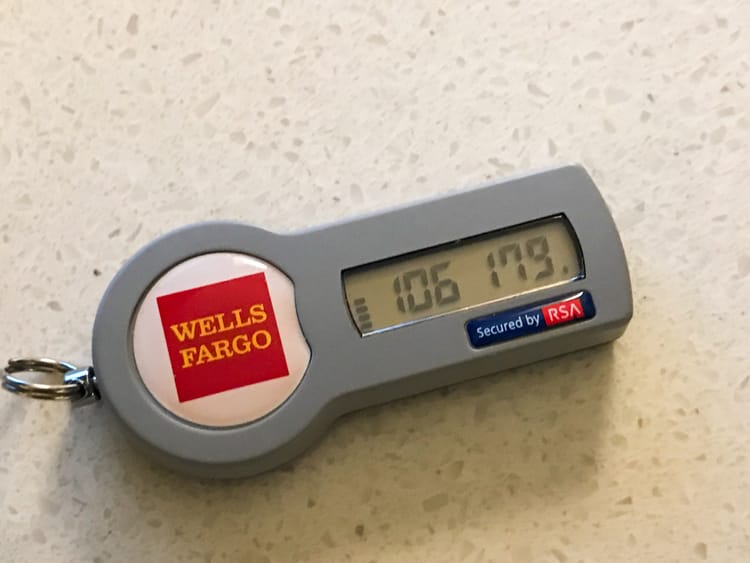
- Something you have. This requires you to provide proof, typically in the form of a rotating 6-digit code, that you have physical possession of something unique to you. In the early days of 2FA, we would carry these small key fobs with an LCD screen showing a 6-digit code that would change every 30 seconds. I used to carry one of these RSA SecurID tokens for years.
I was the only person who knew my password and could produce the matching code. While these tokens are still available, their functionality has been replaced by smart phone apps that generate these codes. In both cases, the code is unique to a single device, making this a very secure way to produce the 2FA code.
While these tokens were very popular in the business world, it wasn’t a practical solution for securing consumer accounts. But, sending an SMS text to a phone number was much easier, and offered a good way to meet that second 2FA criteria, because that SMS text message would go to a single phone number tied to a single device. This worked fairly well until SIM-jackingbecame a thing. Fortunately, there are ways to secure your SIM with a PIN. The other risk comes in the form of VoIP services. Here, you have a phone number that can be accessed on any internet-connected device, which violates the second factor. If someone gained access to your online account for your VoIP service account, they would then be able to bypass all of your 2FA. This is a crime that can be done from anywhere in the world, while a hacker would have to physically steal your phone or 2FA token.
VoIP phone service vs. cellular phone service
VoIP stands for Voice over Internet Protocol, and as the name suggests, this is an internet-based communication technology that only needs an internet connection. So you can use a VoIP service on your computer, for example. VoIP services are very popular with businesses big and small as they allow for sophisticated call routing, interactive voice menus, things like that. Google Voice, Tossable Digits, Skype, Ring Central, or Vonage are some examples of VoIP providers. There are scores more. While a VoIP service is a great fit for many phone needs, there is one important flaw that makes VoIP a poor choice for this audience. Because VoIP is not tied to a single device, some banks, financial institutions, and other online services will not send 2FA codes by SMS text to any phone number they identify as using a VoIP service. The vast majority of services will send 2FA codes to VoIP services, and most people have no problems, but there is no way to know if this will work for you until you test it yourself. And even if it works today, it might not work in the future, should your bank decide to improve their online security.
But, by having your USA phone number on a cellular service plan, you have a few advantages. First, for 2FA, your phone number is tied to a single, unique device; your phone, so you won’t run the risk of your bank not sending you those codes. You also have a USA cellular phone plan that you can use when visiting The States. The one big disadvantage is that, until recently, your phone had to be in range of a compatible cellular network tower to connect. Thankfully, that problem was solved a few years ago by Wi-Fi calling.
Wi-Fi calling
Time to introduce the hero of our story; Wi-Fi calling. This technology was originally designed to help people who lived in areas with poor cellular phone service by allowing them to use their home internet service as an alternative means to connect to their provider’s network. With Wi-Fi calling enabled, if your phone is unable to get a signal from your provider’s cell towers, you can switch over to using an available Wi-Fi network to connect. Later, as phone technology advanced, it became possible to use any internet connection, so now most phones will allow you to use either Wi-Fi or the internet connection from a second SIM to connect to the cell phone network. So, whether you’re at a cabin in the woods of Montana, or walking down the streets of Porto, if your phone has some form of internet connection, Wi-Fi calling will allow your USA SIM to connect.
Also, with Wi-Fi calling enabled and working, you can use your USA phone number exactly the same as if you were physically located in the USA. Calling a business in your old home town is a local call. Same for SMS texting. As far as the rest of the world can tell, your phone is in the USA.
SMS texting vs messaging
A quick side note on “messaging” and “texting”. While most Americans will use these terms interchangeably, they are actually two very different technologies, with very specific meanings. I use the term “SMS texting” to refer to sending and receiving text messages that require a cellular network service and connection to use. This is the old-school technology that goes back to the 1980s, and now also includes MMS, and the newest RCS technology. The key factor is that a cellular phone network is involved in at least a portion of the process. When someone on an iPhone uses Apple Messages to send a message to an Android user, that will be an “SMS text”. Any automatic message sent by a bank or business uses SMS texting.
Nearly all person-to-person messaging, at least outside the USA, has now moved to various messaging platforms. Similar user experience, but different technology. Apple users have iMessage. There’s WhatsApp, Telegram, Facebook Messenger and a host of other online messaging services. The key thing to understand is that all of these services are 100% internet-based and do not need any form of cellular network connection to work. Yes, some of these services, like WhatsApp, require you to provide a phone number, but that is only to limit you to a single account. Once you’ve received the verification code by SMS text, you no longer need a phone connection, just internet, for these services to work. The only role your phone number plays here is as a means of identifying you. And because these messaging services do not use your mobile phone (cell phone) service, they are not subject to any of the restrictions SMS texting has. There is no such thing as international calling or roaming with these services, for example. This is a big reason why they are so popular outside the USA. So, technically speaking, you do not “text” with WhatsApp, you “message”. I know that may sound incredibly pedantic, but at the same time, you really need to have a clear understanding of the differences.
Roaming, and international calling
Roaming is when you pay your phone company extra so they can arrange “guest access” to a partner cellphone company’s service in another country. While okay for vacations and short stays, it 100% is not a viable solution for when you move to Portugal. It is outrageously expensive, and all USA phone providers have limits on how long you can use roaming.
International calling is a service provided by phone companies that offer discount rates when calling from your “home” country to other countries. If you have Verizon, AT&T, T-Mobile, Mint, Tello, etc… that means international calling is placing calls from the USA to other countries. It does not help you in any way make calls from Portugal back to the USA.
The good news is that you do NOT need either service add-on. In fact, you should never add these services to your phone plan after you move to Portugal. If you think you might benefit from either service, please re-read the information above. So, please do not enable either service, it is a complete waste of time and money and will do nothing to help. If you are having problems getting your service to work as expected, neither of these will solve that problem, only waste your time.
What you will need to make this work
The key factor to getting this set up to work is having the right phone. You need a phone that supports the following technology:
- Supports dual SIMs. This means your phone can have two active SIMs at the same time. Only one of the two SIMs can handle the data needs, but either SIM can place and receive phone calls and SMS texts at the same time without any need to toggle back and forth.
- Support for eSIM. An eSIM, or embedded SIM, is a software-based SIM that authenticates you to your cell phone provider. Unlike a SIM card, an eSIM can be installed and activated remotely, without the need to be in range of a compatible cell tower. That means you can install and activate a Tello eSIM from Portugal.
- As mentioned earlier, your phone must also support Wi-Fi calling.
- Super important Your phone must not have a carrier lock on it. Pay off your phone! If you are still making payments on your phone through your current US phone provider, pay it off now. Consider this a cost of the move. There is no good reason to keep paying off your phone after you move. Cleanly separate from your current provider or face the consequences. You’ve been warned.
So, what phones do all of this? If you have an iPhone, that’s an easy answer; anything newer than the iPhone X will work just fine. If you have an older iPhone, you should strongly consider replacing it, as you will have many other problems beyond not being able to use this process. For Android users, the answer is more complicated due to the huge variety of available phones. Generally speaking any Google Pixel, Samsung Galaxy S series from the last few years is a good option. Beware of budget Android phones, as they typically lack the required features. This website is a good place to research your Android phone.
Important notes:
- Many phones have 1 SIM card slot and allow for 1 active eSIM. Make sure your active eSIM is used for the Tello eSIM. If your phone lacks the SIM card slot, but has 2 eSIMs that is even better. The key factor is you MUST use an eSIM for Tello
- Your phone must be paid off and unlocked
- When setting this up, make sure you are at home with a solid Wi-Fi internet connection
- If you have multiple people on your current cell phone plan, be careful with the phone number for the primary account holder, and migrate that one last
How much it will cost
For Tello, all you need is their $5.00 per month plan, with zero data, 100 minutes of voice calls, and unlimited text. This is the perfect plan while you are in Portugal. If you have a visit back to The States, you can temporarily upgraded to a plan that includes data for the duration of your trip, then drop back down to the zero data plan.
Yes, Google Voice is free. But you know what they say about a free service; “you are the product”. For a variety of reasons, I strongly recommend against the free Google Voice option.
Also, the US massively overpays for cell phone and home internet service. Here in Portugal, a couple can get 2 mobile phones each with 20GB of data, ultra-fast 1 gigabit fiber optic home internet service and 170+ TV channels for under the equivalent of $80 per month. That price can be lower if you get less mobile data, or opt for the (still blazing fast) 500 megabit fiber optic home internet service.
The best approach for nearly everyone
- Tello is better than Mint or other MVNO options because they actively cater to Americans living overseas
- Tello allows you to change your plan at any time. This is a big deal because you can upgrade to a plan with data for any time spent in the US, and downgrade to the cheapest plan when outside the US.
- Tello resells access to the T-Mobile network in the US, and can be used as a regular cell phone plan while in The States, saving you from having to get a travel eSIM when visiting.
- Tello is a real cell phone service, not a VoIP service, so it is more reliable for SMS 2FA codes
The basic approach:
- Make sure your phone meets the requirements.
- Sign up for Tello and they will assign you a temporary phone number - be very careful to explicitly request the eSIM.
- Install the Tello app and follow their instructions to install and activate the eSIM.
- Do NOT port your US phone number (yet)
- In your Tello account, make sure to specify a valid residential address as your e911 address. Do not use a virtual mailbox address. This can be your old home address, a relative’s address, doesn’t matter as long as it is a residential address. Failure to do so will prevent Wi-Fi calling from working. And that would be bad.
- Time to test. Please see the testing FAQ listed below. Test your new eSIM using the temporary phone number assigned by Tello. Make sure this all works before you port over your regular phone number.
- If you currently have a USA phone number you want to keep, follow Tello’s guide for porting that phone number from your current provider to Tello. That will replace the temporary phone number with your actual phone number.
- Configure your Tello eSIM to use Wi-Fi calling.
- When you arrive in Portugal, as soon as possible, sign up for MEO, NOS, Vodafone (or other provider) and install the SIM card (or 2nd eSIM) and activate your Portuguese phone number.
- While in Portugal, make sure your Portuguese SIM is assigned to handle the data for your phone.
This is a high-level overview of the process, and certain elements may differ depending on your specific phone. But in the end, you will wind up with one phone with 2 SIMs. Tello will be on an eSIM and will have Wi-Fi calling enabled. Your Portuguese SIM will handle the data.
Timing and planning the transition
For people switching over to Tello before their move to Portugal, timing can be a bit tricky. You will need phone service in the US before you move. Also, most folks don’t have a Portuguese mobile phone plan lined up before the big move, so they’ll need to have some sort of mobile data/internet access when they arrive in Portugal. Something to bridge the gap until they can get set up with MEO, NOS, Vodafone, or one of the budget providers. Here are a few strategies to help with the timing issues.
When is the best time to switch to Tello?
I’ve helped folks set up Tello and port their previous phone number over to Tello after they’ve moved to Portugal. But, while possible, I think it is much more convenient to do that before you move. Tello resells access to the T-Mobile network, so you should get very good coverage in nearly the entire US.
Because of that, I would aim to make the switch at least 1 month prior to your move. Give yourself some breathing room. Nine times out of ten, the switch goes smoothly, but if there is a snag, you will have more time to solve any problems that might arise. Any problem might, at most, take up to a day to resolve, but save the stress and tackle this earlier. Once you’ve ported your phone number over to Tello, for the rest of your time in the US, your phone will behave as a normal phone.
I don’t have a Portuguese phone plan yet, how can I make sure I have mobile data when I first arrive?
You will want access to mobile data the moment you step off the plan in Portugal. If you hired a driver to pick you up at the airport, you’ll need WhatsApp to check in. Rented a car? You’ll need maps. Translation apps, access to email, the list goes on. But, your Tello eSIM is not meant to provide roaming coverage, and you don’t yet have a local provider. You could add roaming data to your Tello plan, but I strongly advise against that as it tends to be slow, spotty and very expensive. One cent per megabyte of data sounds cheap at first, but ten gigabytes will cost you $100. Instead, you need a travel eSIM.
A travel eSIM is a special-purpose eSIM that is good for one thing only; providing you with mobile data for a short period of time. No contract, no phone number, just data for a couple days, weeks, or months. There are several good options for buying a travel eSIM. I have the most experience with Airalo, but I’ve heard plenty of of good things about Saily and Holafly, too. For this particular situation, any of these 3 should be a good choice. You won’t need this service for very long, just enough time and data to keep you going until you can get your Portuguese service established.
Before you fly out, install the app for your travel eSIM provider, create the account, and login. Pick a plan. For example, Airalo has a 15-day plan that provides 5GB of data for €7. If you went with roaming from Tello, that same 5GB of data would cost $50.
How this works on your phone will depend a lot on if your phone supports dual eSIMs, or supports 1 eSIM and 1 SIM card. Newer “flagship” phones sold in the US support dual eSIM. These include any iPhone from the iPhone 14 and later, as well as the Google Pixel 8 or newer, Samsung Galaxy S23 or newer, and certain Motorola and OnePlus models. Check your phone’s documentation to confirm.
If your phone supports 2 active eSIMs at the same time, you are set. Leave your Tello eSIM as is, and simply install and activate your travel eSIM alongside the Tello eSIM. But, if your phone only supports 1 active eSIM at a time, the process is a bit more complicated. While your phone can online have 1 active eSIM, you can have more than one eSIM installed. So you will need to temporarily deactivate your Tello eSIM in order to use the travel eSIM. Later, after you’ve installed your Portuguese phone provider’s SIM card, you can stop using the travel eSIM. This means your US phone number will be unavailable while using the travel eSIM, so this is only a very short-term solution.
FAQs
I am still using my USA cell phone plan, why should I go through all this hassle to switch?
There are a few reasons. First, all US mobile phone companies restrict the amount of time you can use roaming. Typically 90 to 100 days. This might not be strictly enforced, but it is a limit. Also, using your USA phone plan is ridiculously expensive, and that is before the even more ridiculous roaming fees. Keeping a USA phone plan active for more than a month after you move is just burning money. There are zero good reasons to stick with your US plan. Zero.
Will I have access to my USA phone number for calls and texts when I’m out of the house?
The answer is generally “yes” but a lot will depend on your specific phone model. If you have a newer iPhone, it can use the internet connection from your Portuguese SIM to enable the Wi-Fi calling feature, so you won’t need access to an actual Wi-Fi network. The answer is a bit more complicated for Android users, as some of these phones will not allow the other SIM to provide the internet connection needed for Wi-Fi calling on your Tello SIM. In that case, you might need to connect to an actual Wi-Fi network.
Can I make this update after I’ve moved to Portugal?
Yes, Tello and eSIM technology means you can activate your Tello eSIM from outside the USA. If you can make this switch before you move, it will be a bit easier, but you can still make the switch after you move.
Is this the best way for me to get 2FA codes?
Surprisingly, my answer is “no”, this is not the best way to get 2FA codes. It is better than using Google Voice or other VoIP systems. It is 100% better than getting the code by email, but there are still better options. Unfortunately, your bank or online service might not support either of the two better options.
- Use a 2FA code generating app. There are many to pick from, such as Authy, Google Authenticator, DUO, and popular password manager software like 1Password or Bit Warden. Always look for this option if available. Once set up, it is more secure and far more convenient.
- Even better, see if you can enable a passkey for your account, eliminating the need for both the 2FA code and your username and password. Passkeys are likely the future of online security, so if you can start now, all the better.
How can I test my new configuration to make sure it works?
Once you have set up your Tello eSIM, you need to test it to make sure it works under a few circumstances. First, place a call using the phone number assigned to the Tello app to make sure it connects. To test the Wi-Fi calling feature, put your phone in airplane mode then make sure only Wi-Fi is enabled and your cell connection is off. Place a phone call again.
Repeat these steps for texting, but instead of sending a text, which could go out over iMessage, use this trick instead. Visit https://www.bulksms.com/test/ and entire the phone number for your Tello SIM, and send a test. This will make sure you are testing the SMS functionality, and not accidentally testing internet messaging. You should get a test message via SMS text in normal mode, and with only Wi-Fi active.
Member discussion